# Files Structure

We have used components in Laravel to organize our code more efficiently. Most of the code can be found in the components folder.

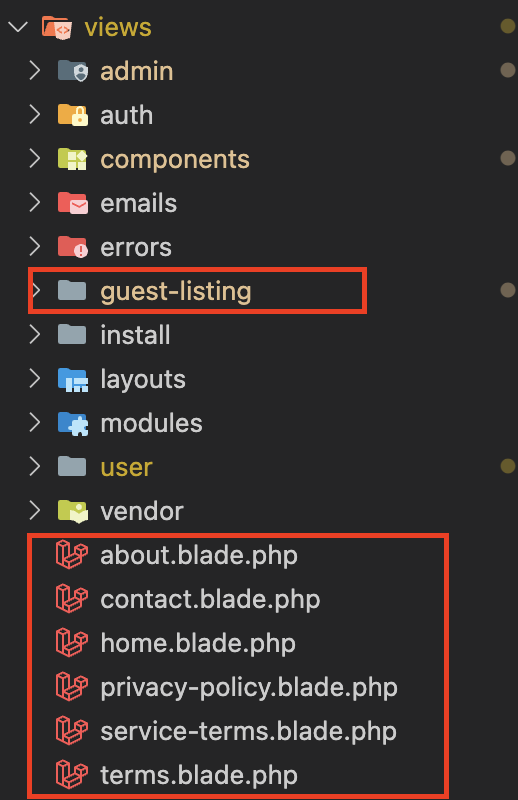
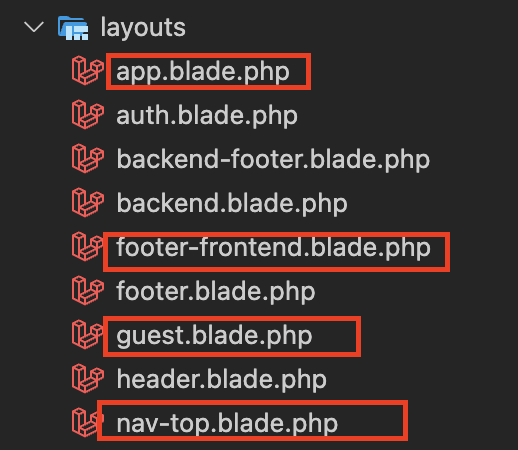
1. All files used for frontend pages are located in the `resources/views` directory, `resources/views/components` and with some additional files in the `resources/views/layouts` directory, as shown in the image.

<div><figure><img src="https://1156155356-files.gitbook.io/~/files/v0/b/gitbook-x-prod.appspot.com/o/spaces%2Fpb8ANp0ZN6ZvWH8LcR5c%2Fuploads%2F2Y2Uvnq2yTqtjjn0Gnfx%2FScreenshot%202024-06-25%20at%2011.17.32%E2%80%AFAM.png?alt=media&#x26;token=375db376-0965-43dd-9a34-db3186759286" alt=""><figcaption></figcaption></figure> <figure><img src="https://1156155356-files.gitbook.io/~/files/v0/b/gitbook-x-prod.appspot.com/o/spaces%2Fpb8ANp0ZN6ZvWH8LcR5c%2Fuploads%2Fh9ZnZpTem43oMvqgI7ZT%2FScreenshot%202024-06-25%20at%2011.15.04%E2%80%AFAM.png?alt=media&#x26;token=d1aebf5c-3709-48e8-ad1f-c175bd59c665" alt=""><figcaption></figcaption></figure> <figure><img src="https://1156155356-files.gitbook.io/~/files/v0/b/gitbook-x-prod.appspot.com/o/spaces%2Fpb8ANp0ZN6ZvWH8LcR5c%2Fuploads%2FscCJEa7OcYtE1LkxSv8O%2FScreenshot%202024-06-25%20at%2011.20.37%E2%80%AFAM.png?alt=media&#x26;token=690d7e86-22b7-42c5-a7e9-a7df25086479" alt=""><figcaption></figcaption></figure></div>

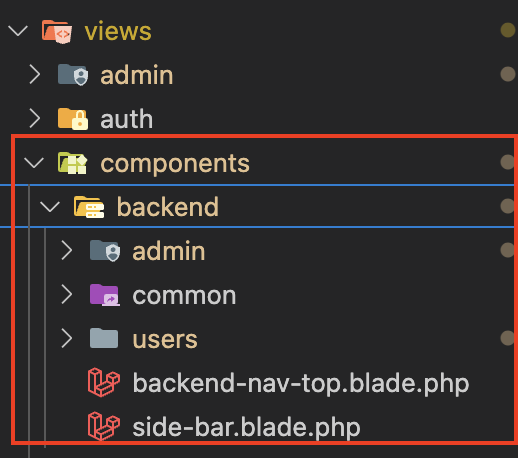
2. All files used for backend pages are located in the `resources/views` directory, `resources/views/components/backend` and with some additional files in the `resources/views/layouts` directory, as shown in the image.

<div><figure><img src="https://1156155356-files.gitbook.io/~/files/v0/b/gitbook-x-prod.appspot.com/o/spaces%2Fpb8ANp0ZN6ZvWH8LcR5c%2Fuploads%2Fuwow48cLPcjIWMiD4Ch7%2FScreenshot%202024-06-25%20at%2011.16.29%E2%80%AFAM.png?alt=media&#x26;token=a1eaf4f8-fe12-44af-9dcd-a6b65cb7f8d2" alt=""><figcaption></figcaption></figure> <figure><img src="https://1156155356-files.gitbook.io/~/files/v0/b/gitbook-x-prod.appspot.com/o/spaces%2Fpb8ANp0ZN6ZvWH8LcR5c%2Fuploads%2FgZrNtP8F9f0b0x6VUV09%2FScreenshot%202024-06-25%20at%2011.15.38%E2%80%AFAM.png?alt=media&#x26;token=1a7e4348-4a46-464a-8345-a6a27cc7e171" alt=""><figcaption></figcaption></figure> <figure><img src="https://1156155356-files.gitbook.io/~/files/v0/b/gitbook-x-prod.appspot.com/o/spaces%2Fpb8ANp0ZN6ZvWH8LcR5c%2Fuploads%2F5QJQFXfvLdfi3x3qOSqv%2FScreenshot%202024-06-25%20at%2011.16.10%E2%80%AFAM.png?alt=media&#x26;token=b2831308-ce76-4d5e-ba33-62e0a3778d1a" alt=""><figcaption></figcaption></figure></div>

For styling, we can utilized [Tailwind CSS](https://tailwindcss.com/) which has been compiled in `public/css/app.css,` `public/css/style.css,` and  some custom css which can be found in the `public/css/custom.css.`  For custom **CSS** or **JS**, you can add your reference to it in Frontend Manager under the css and js section. example `public/css/example.css`  or  `public/js/example.js`

{% hint style="info" %}
NOTE: Codecanyon support plan does not include any customization support, any modification or customization will be up to you or you can also reach out to us.
{% endhint %}