# phpMyAdmin MySQL DB Setup
### How to Create a New Database in phpMyAdmin:
1. Log in to **phpMyAdmin**.
2. Click on the "**New**" button to create a new database.
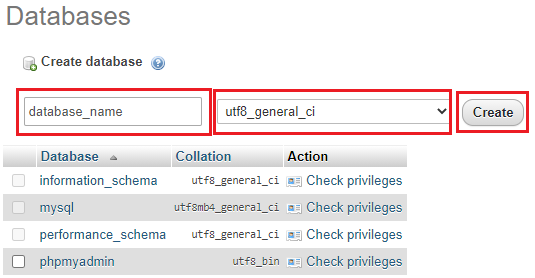
3. Enter a name for the database, select **`utf8_general_ci`** as the collation, and click the "**Create**" button.
4. Ensure you have a database user with access to the newly created database. If not, create one with all necessary permissions and set a password.
5. To avoid issues with database setup, ensure that the new database uses InnoDB as the storage engine.
6. Return to the Install process and enter your newly created database credentials. If using local server, you can set database host to **localhost**, and for mysql port use **3306**